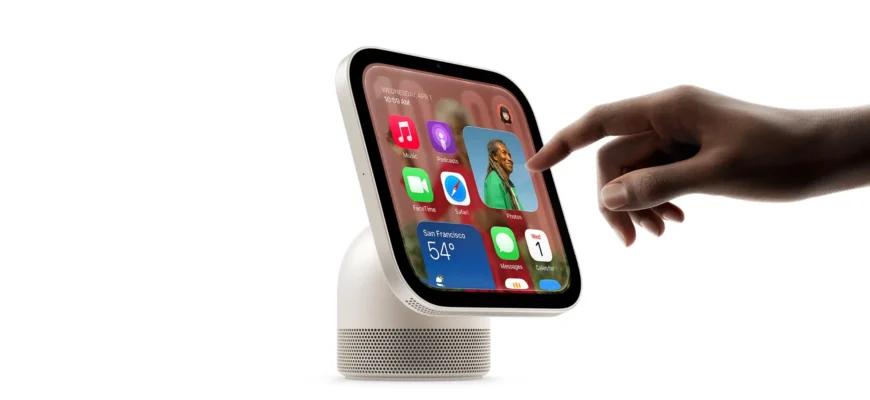
Coinciding with the launch of Apple HomeView, the company has been updating its support website with new guides covering everything from facial recognition and user profiles to troubleshooting and repairs. Here are the details.
Apple HomeView support documents now up
Soon after announcing HomeView, Apple published a dedicated support page detailing the device’s repair and service options, including estimated out-of-warranty costs.
Since then, the company has occasionally published HomeView-related support documents, but the pace has picked up over the past two days, coinciding with the device’s official launch.
For instance, the Apple HomeView User Guide covers everything from setting up the device and customizing its Home Screen to using Siri AI, managing user profiles, and controlling smart home accessories.
Beyond the user guide, Apple has also published several support documents covering common issues, troubleshooting steps, and repair procedures, including:
If a warning symbol appears on Apple HomeView
If “Confirm Your Identity” appears on Apple HomeView
If settings or data are missing on Apple HomeView
If Apple HomeView shows an “App Unavailable” message
Prepare your Apple HomeView for Express Replacement Service
Send your Apple HomeView to Apple for service
Power adapters for Apple HomeView
If Apple HomeView doesn’t recognize you
If you can’t set up Apple HomeView
If Apple HomeView won’t turn on or is unresponsive
Find the serial number for your Apple HomeView
If you can’t access your content on Apple HomeView
If you can’t add others to Apple HomeView
In the coming days and weeks, Apple is expected to keep expanding its collection of HomeView support documents.
To learn more about Apple’s support and troubleshooting material, follow this link.
Be sure to also check out 9to5Mac’s full review of the Apple HomeView.